一,信息设定
该方案适配游戏工作室多窗口 / 多设备独立 IP、流量隔离、防封防检测核心需求,基于 RouterOS(ROS)实现多公网 IP 绑定 + 按设备 / 按端口 / 按应用分流,支持静态 IP 绑定分流、动态负载分流两种核心模式,兼顾稳定性(防 IP 串流)和灵活性(带宽利用),以下为硬件要求 + 完整配置命令 + 分流规则 + 避坑要点,命令可直接复制到 ROS 终端执行。
二,前期准备
1. 硬件 / 网络要求
ROS 设备:推荐 RB4011/CRS305/AX3600(刷 ROS),至少1 个 WAN 口(多 IP 进线)+1 个及以上 LAN 口(工作室内网),支持多网口桥接 / 路由模式;
公网 IP 资源:运营商提供的固定公网 IP 段(如 1.1.1.1/29,共 6 个可用 IP),或多个独立公网 IP(单 IP 专线),要求IP 可独立拨号 / 静态绑定,避免运营商 NAT 内网 IP;
内网规划:工作室设备做固定内网 IP 段划分(如 192.168.10.0/24,每台设备分配固定内网 IP),建议用 ROS 做 DHCP 服务器,禁止设备自动获取 IP,核心:内网 IP 与公网 IP 一一绑定,避免串流。
2. ROS 基础配置前提
已刷好 RouterOS 系统,完成初始登录(Winbox/WEB/ 终端);
WAN 口已接入运营商多 IP 线路,能正常获取公网 IP(静态 IP 需提前配置 WAN 口 IP / 网关 / DNS);
LAN 口已配置内网段(如 192.168.10.1/24),DHCP 服务器已开启并分配固定 IP。
二、核心网络模式选择
游戏工作室优先选模式 1:静态 IP 一对一绑定分流(防封优先级最高,单设备 / 单窗口对应唯一公网 IP,无串流);若 IP 数量少、设备多,可选模式 2:多 IP 负载分流 + 端口隔离(适合轻量工作室),以下重点讲模式 1(实战最常用)。
核心原则
1、公网 IP 与内网设备一一映射,每台设备的所有流量仅走指定公网 IP;
2、关闭 ROS 的 NAT 杂合模式,禁止不同公网 IP 的流量互相转发;
3、开启 IP 隔离,内网设备之间无法互通(防止工作室设备互相感染 / 封机牵连)。
三,操作步骤
三、模式 1:静态 IP 一对一绑定分流(完整配置)
场景举例
公网 IP 段:运营商提供5 个固定公网 IP(202.103.1.2/24、202.103.1.3/24、202.103.1.4/24、202.103.1.5/24、202.103.1.6/24),网关 202.103.1.1,DNS 223.5.5.5/223.6.6.6;
WAN 口:ROS 的ether1为 WAN 口,接入运营商多 IP 线路;
LAN 口:ROS 的ether2为 LAN 口,内网段192.168.10.0/24,网关 192.168.10.1;
内网设备:5 台工作室电脑,固定内网 IP 为192.168.10.10-192.168.10.14,分别绑定公网 IP202.103.1.2-202.103.1.6。
步骤 1:配置 WAN 口多公网 IP(静态 IP 模式)
ROS 的 WAN 口(ether1)需要添加所有公网 IP,执行以下命令(Winbox 终端 / SSH 均可),可直接复制:
# 给ether1添加第一个公网IP(主IP)
/ip address add address=202.103.1.2/24 interface=ether1 network=202.103.1.0
# 依次添加剩余公网IP
/ip address add address=202.103.1.3/24 interface=ether1 network=202.103.1.0
/ip address add address=202.103.1.4/24 interface=ether1 network=202.103.1.0
/ip address add address=202.103.1.5/24 interface=ether1 network=202.103.1.0
/ip address add address=202.103.1.6/24 interface=ether1 network=202.103.1.0
# 配置WAN口网关(运营商提供)
/ip route add dst-address=0.0.0.0/0 gateway=202.103.1.1 distance=1 check-gateway=ping
# 配置DNS(阿里公共DNS,避免运营商DNS污染)
/ip dns set servers=223.5.5.5,223.6.6.6 allow-remote-requests=yes
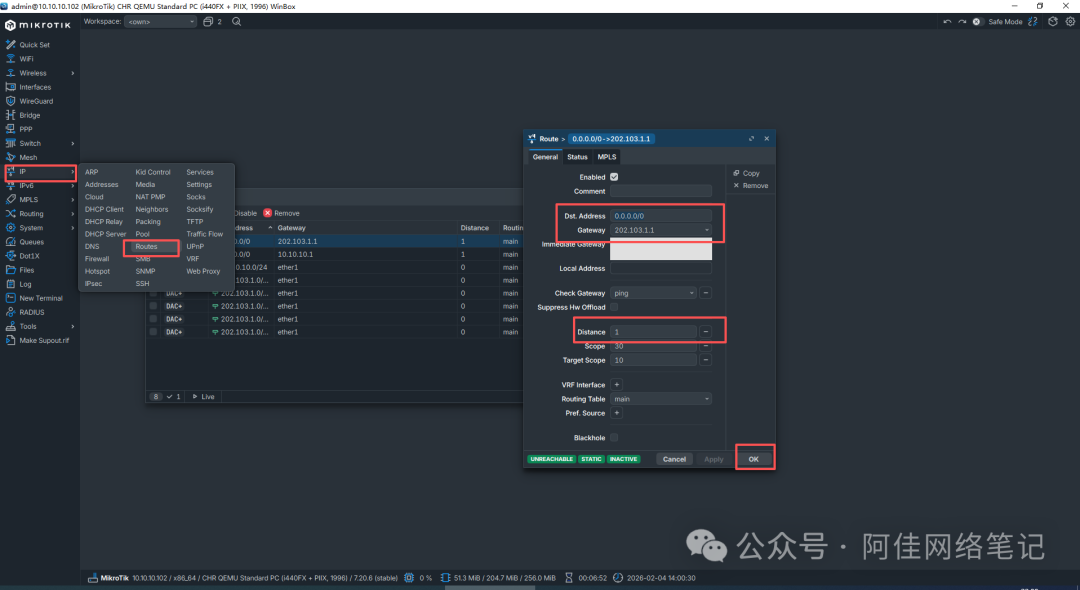
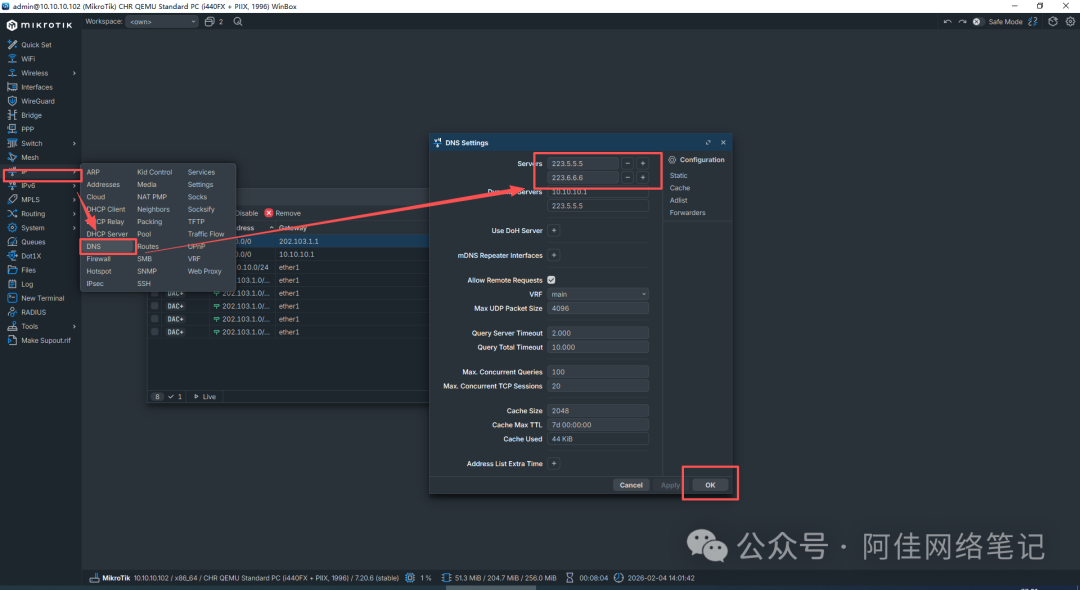
验证:执行/ip address print,查看 ether1 下是否有所有公网 IP,执行ping 223.5.5.5,能 ping 通则 WAN 口网络正常。
步骤 2:配置 LAN 口内网 + DHCP 固定 IP(禁止自动获取)
确保内网设备均为固定 IP,ROS 作为 DHCP 服务器,绑定设备 MAC 与内网 IP,执行以下命令:
# 配置LAN口(ether2)内网IP
/ip address add address=192.168.10.1/24 interface=ether2 network=192.168.10.0
# 开启DHCP服务器,禁用自动分配,仅保留静态绑定
/ip dhcp-server add name=dhcp1 interface=ether2 address-pool=dhcp_pool1 disabled=no
/ip pool add name=dhcp_pool1 ranges=192.168.10.100-192.168.10.200
# 预留非工作室IP段
/ip dhcp-server network add address=192.168.10.0/24 gateway=192.168.10.1 dns-server=223.5.5.5,223.6.6.6
# 绑定工作室设备MAC与固定内网IP(替换为实际设备MAC地址!)
/ip dhcp-server lease add mac-address=AA:BB:CC:DD:EE:01 address=192.168.10.10 comment=GamePC1
/ip dhcp-server lease add mac-address=AA:BB:CC:DD:EE:02 address=192.168.10.11 comment=GamePC2
/ip dhcp-server lease add mac-address=AA:BB:CC:DD:EE:03 address=192.168.10.12 comment=GamePC3
/ip dhcp-server lease add mac-address=AA:BB:CC:DD:EE:04 address=192.168.10.13 comment=GamePC4
/ip dhcp-server lease add mac-address=AA:BB:CC:DD:EE:05 address=192.168.10.14 comment=GamePC5
关键:mac-address必须替换为工作室设备的实际网卡 MAC(可在设备本地执行ipconfig /all查看),添加comment方便后续管理。
步骤 3:配置 NAT 规则(核心:内网 IP→公网 IP 一对一映射)
ROS 的 NAT 规则是分流核心,需配置源 NAT(srcnat),实现指定内网 IP 的流量,仅通过指定公网 IP 转发,执行以下命令(可直接复制,按场景匹配):
# 规则1:GamePC1(192.168.10.10)→公网IP1(202.103.1.2)
/ip firewall nat add chain=srcnat action=masquerade src-address=192.168.10.10out-interface=ether1 to-addresses=202.103.1.2 comment=GamePC1-IP1
# 规则2:GamePC2(192.168.10.11)→公网IP2(202.103.1.3)
/ip firewall nat add chain=srcnat action=masquerade src-address=192.168.10.11out-interface=ether1 to-addresses=202.103.1.3 comment=GamePC2-IP2
# 规则3:GamePC3(192.168.10.12)→公网IP3(202.103.1.4)
/ip firewall nat add chain=srcnat action=masquerade src-address=192.168.10.12out-interface=ether1 to-addresses=202.103.1.4 comment=GamePC3-IP3
# 规则4:GamePC4(192.168.10.13)→公网IP4(202.103.1.5)
/ip firewall nat add chain=srcnat action=masquerade src-address=192.168.10.13out-interface=ether1 to-addresses=202.103.1.5 comment=GamePC4-IP4
# 规则5:GamePC5(192.168.10.14)→公网IP5(202.103.1.6)
/ip firewall nat add chain=srcnat action=masquerade src-address=192.168.10.14out-interface=ether1 to-addresses=202.103.1.6 comment=GamePC5-IP5
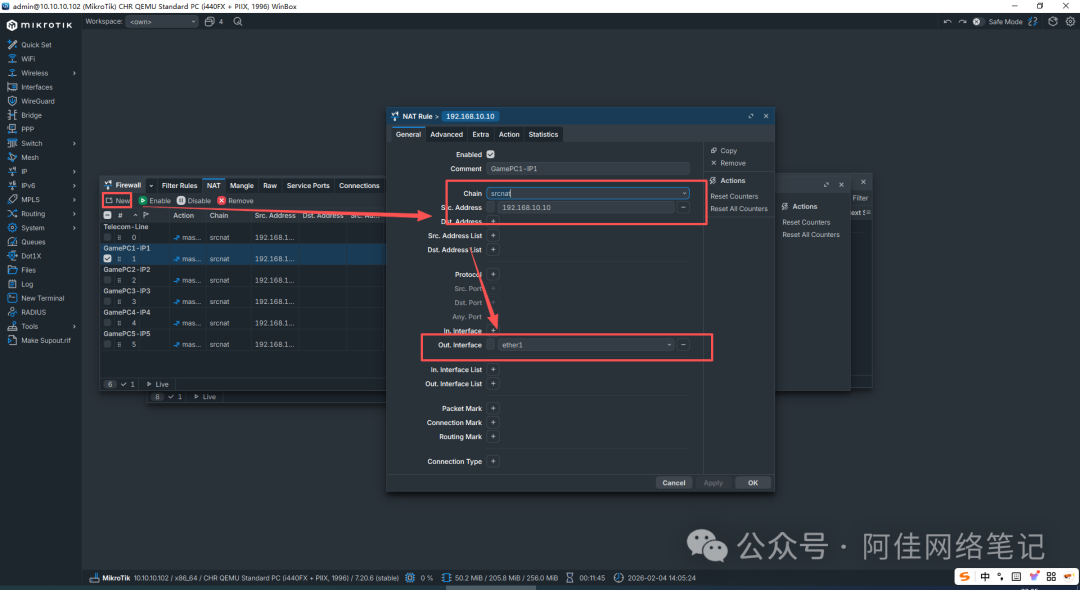
规则优先级:NAT 规则按添加顺序匹配,先匹配的规则优先执行,无需调整优先级,确保每个内网 IP 对应唯一 NAT 规则即可。
步骤 4:配置 IP 隔离(内网设备互不可通,防牵连)
游戏工作室需禁止内网设备之间互相访问,防止一台设备封机牵连其他设备,在 ROS 中配置桥接过滤 + 防火墙规则,执行以下命令:
#
# 禁用内网设备之间的IP转发
/ip firewall filter add chain=forward action=drop src-address=192.168.10.0/24 dst-address=192.168.10.0/24 comment=LAN-Isolate
# 允许内网设备访问ROS网关(如登录Winbox/WEB管理)
/ip firewall filter add chain=forward action=accept src-address=192.168.10.0/24 dst-address=192.168.10.1 comment=Allow
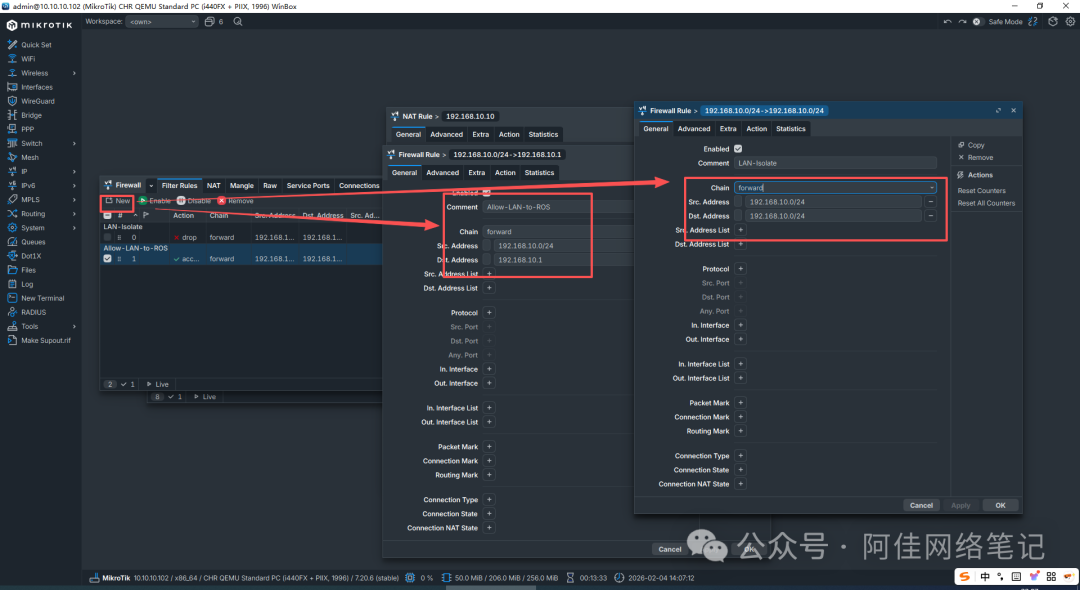
验证:工作室设备之间互相 ping,应提示请求超时,但能 ping 通 ROS 网关(192.168.10.1)和公网(如 223.5.5.5)。
步骤 5:配置带宽限制(可选,防止单设备占满带宽)
若工作室带宽有限,可给每个内网设备配置上行 / 下行带宽限制,避免单设备挂机 / 下载占满带宽,执行以下命令(示例:每台设备下行 100M,上行 50M):
# 创建队列树,基于内网IP限速
/queue simple add name=Limit-GamePC1 target=192.168.10.10/32 max-limit=100M/50M comment=GamePC1-Limit
/queue simple add name=Limit-GamePC2 target=192.168.10.11/32 max-limit=100M/50M comment=GamePC2-Limit
/queue simple add name=Limit-GamePC3 target=192.168.10.12/32 max-limit=100M/50M comment=GamePC3-Limit
/queue simple add name=Limit-GamePC4 target=192.168.10.13/32 max-limit=100M/50M comment=GamePC4-Limit
/queue simple add name=Limit-GamePC5 target=192.168.10.14/32 max-limit=100M/50M comment=GamePC5-Limit
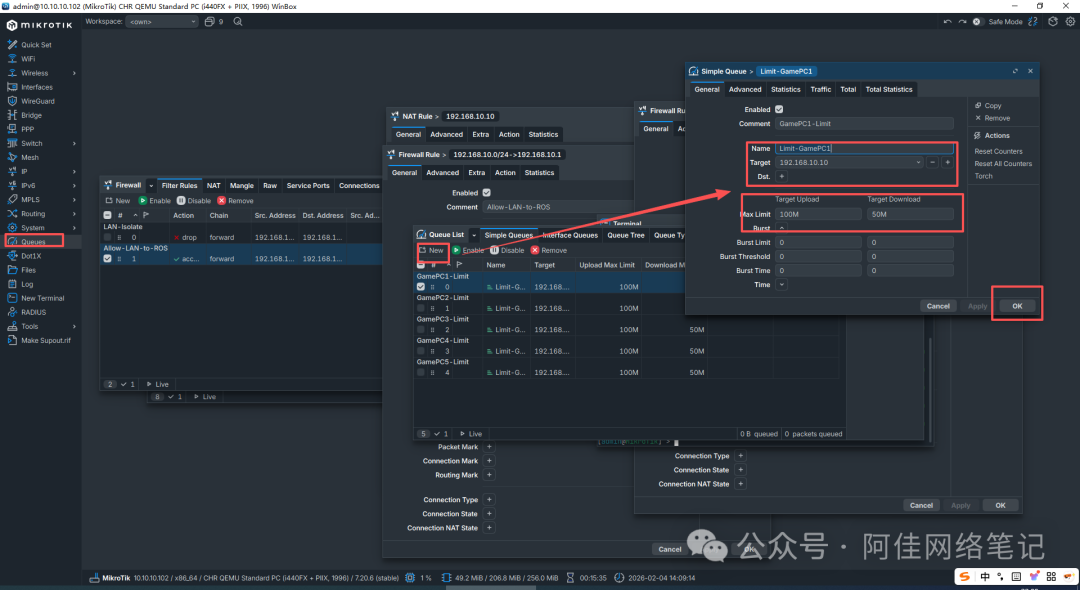
可根据实际带宽调整max-limit(格式:下行 / 上行,单位 M/K/G)。
四、模式 2:多 IP 负载分流 + 端口隔离(IP 少 / 设备多场景)
适用场景
公网 IP 数量<工作室设备数量(如 3 个公网 IP,10 台设备),需将多台设备分配到同一个公网 IP,同时按游戏端口隔离(不同游戏窗口走不同端口,减少封机概率)。
核心配置命令(简化版)
# 1. 配置WAN口多IP(同模式1)
/ip address add address=202.103.1.2/24 interface=ether1 network=202.103.1.0
/ip address add address=202.103.1.3/24 interface=ether1 network=202.103.1.0 /ip address add address=202.103.1.4/24 interface=ether1 network=202.103.1.0
/ip route add dst-address=0.0.0.0/0 gateway=202.103.1.1 distance=1
# 2. 配置源NAT负载分流(3个IP负载,内网段192.168.10.0/24)
/ip firewall nat add chain=srcnat action=masquerade out-interface=ether1 to-addresses=202.103.1.2-202.103.1.4 src-address=192.168.10.0/24 comment=IP-Load-Balance
# 3. 按游戏端口隔离(示例:游戏端口8080/9090/7070,分别映射不同IP)
/ip firewall nat add chain=srcnat action=masquerade out-interface=ether1 to-addresses=202.103.1.2 src-port=8080 comment=Port8080-IP2
/ip firewall nat add chain=srcnat action=masquerade out-interface=ether1 to-addresses=202.103.1.3 src-port=9090 comment=Port9090-IP3
/ip firewall nat add chain=srcnat action=masquerade out-interface=ether1 to-addresses=202.103.1.4 src-port=7070 comment=Port7070-IP4
关键:需在游戏客户端中修改本地端口,让不同窗口使用指定端口,实现 “端口→公网 IP” 的映射。
五、配置验证(必做,确保分流生效)
配置完成后,必须验证每台设备的出口 IP 是否为指定公网 IP,避免串流,方法如下:
在工作室设备上打开浏览器,访问ip.cn/ip138.com,查看出口 IP,应与绑定的公网 IP 一致;在 ROS 终端执行 /ip firewall connection print,查看连接的源 IP / 出口 IP,确认一一对应;执行ping 目标游戏服务器IP,确保网络连通,无丢包。
六、游戏工作室 ROS 配置避坑要点(防封核心)
禁止 IP 串流:绝对不要让多个设备共用一个公网 IP 的同时,又让一个设备走多个公网 IP,ROS 的 NAT 规则必须一对一严格绑定;
/ip upnp set enabled=no
/ip cloud set ddns-enabled=no update-time=no
ROS 默认端口 / 禁用远程登录:ROS 默认 Winbox 端口 8291/SSH 端口 22,易被扫描,建议修改:
/ip service set winbox port=8888 disabled=no # 改Winbox端口为8888
/ip service set ssh port=2222 disabled=no # 改SSH端口为2222
/ip service set telnet disabled=yes # 禁用telnet(不安全)
开启 ROS 防火墙,禁止陌生 IP 访问:仅允许工作室内网 IP 登录 ROS 管理界面,拒绝外网所有 IP:
/ip firewall filter add chain=input action=accept src-address=192.168.10.0/24 comment=Allow-LAN-Manager
/ip firewall filter add chain=input action=drop src-address=0.0.0.0/0 comment=Deny-WAN-Manager
避免使用运营商 NAT IP:必须要求运营商提供公网静态 IP,而非内网 NAT IP(如 10.xx.xx.xx/192.168.xx.xx),否则多设备分流无效,极易被游戏平台检测;
网络参数优化:调整 ROS 的 TCP/IP 参数,提升游戏网络稳定性,减少延迟:
/ip settings set tcp-syncookies=yes tcp-mss=1460 # 开启TCP同步cookie,修改MSS值
/interface set ether1 mtu=1500 ether2 mtu=1500 # 统一MTU为1500(默认)
七、扩展配置:多 WAN 口多线路分流(双运营商 / 多专线)
若工作室有多条运营商线路(如电信 + 联通,或 2 条电信专线),可在 ROS 中配置多 WAN 口分流,实现 “电信设备走电信线路,联通设备走联通线路”,核心是在 NAT 规则中添加
out-interface指定 WAN 口,示例:
# 电信线路(ether1):内网IP192.168.10.0/24走电信公网IP
/ip firewall nat add chain=srcnat action=masquerade src-address=192.168.10.0/24 out-interface=ether1 to-addresses=202.103.1.2-202.103.1.6 comment=Telecom-Line
# 联通线路(ether3):内网IP192.168.20.0/24走联通公网IP
/ip firewall nat add chain=srcnat action=masquerade src-address=192.168.20.0/24 out-interface=ether3 to-addresses=112.xx.xx.2-112.xx.xx.6 comment=Unicom-Line